 By
ByQuick Picks: Our Top Recommendations

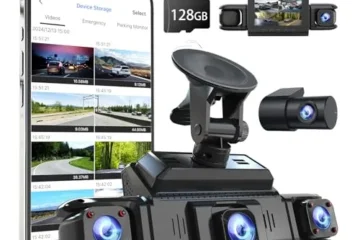
REDTIGER 4K STARVIS 2 Dashcam Front Rear
[4K+1080P Dual Recording] REDTIGER F7N TOUCH captures your drive journey in…

Affver 4K+2.5K Dash Cam Front and Rear
【Upgraded Since Jun 1, 2026】We’ve leveled up the A4! The rear c…

Garmin dēzlCam™ OTR725 – 7” GPS Truck Navigator
7-inch truck navigator with a built-in dash cam to serve as your eyewitness…
| Rank | Product | Price | Rating | Action |
|---|---|---|---|---|
| #1 | Top Choice REDTIGER 4K STARVIS 2 Dashcam Front Rear | $169.99 | 4.5 | View on Amazon |
| #2 | Best Value Affver 4K+2.5K Dash Cam Front and Rear | $76.49 | 4.5 | View on Amazon |
| #3 | Contender Garmin dēzlCam™ OTR725 – 7” GPS Truck Navigat… | $599.99 | 4.5 | View on Amazon |
| #4 |  Contender Icesky 4K Dash Cam Front and Rear Left Right with … | $129.99 | 4.5 | View on Amazon |
| #5 |  Contender IIWEY N6 360° Dash Cam 4 Channel | $109.95 | 4.5 | View on Amazon |
If you want the best all-round mix of image quality, GPS logging, and everyday usability, the REDTIGER F7N Touch is the one I’d hand to most drivers. The 4K front and 1080p rear pairing with a STARVIS 2 sensor holds up impressively after dark, and the combination of built-in GPS, 5.8GHz WiFi, voice commands, and a genuinely responsive touchscreen makes it feel like a premium dashcam at a $169.99 price. The included 128GB card sweetens the deal, and the 20MB/s download speed via the REDTIGER Cam app means you’re not waiting around at the roadside to pull footage. It’s the pick that balances price, performance, and polish better than anything else in this group.
For budget-conscious buyers, the Affver 4K+2.5K Dash Cam at $76.49 is the standout value. The June 2026 refresh bumped the rear camera to 2.5K and swapped in WiFi 6, so you’re getting dual-channel 4K plus GPS tracking for less than half the REDTIGER’s price. The 3.59-inch IPS screen is easy to read, and the low-profile mount keeps your windshield clean.
If your priority is maximum coverage instead, the Icesky 4K 4-Channel Dash Cam ($129.99) and IIWEY N6 ($109.95) both deliver true 360° recording with GPS and 128GB cards included, with the Icesky leaning on 4K front footage and the IIWEY offering STARVIS 2K across all four channels plus 48-hour parking surveillance. And if you drive a rig for a living, the Garmin dēzlCam OTR725 is in a class of its own, a 7-inch truck navigator with custom routing, BirdsEye arrival imagery, and a built-in 1080p dashcam that makes it a legitimate work tool rather than just a camera. For most people, though, the REDTIGER F7N Touch remains the dashcam with GPS I’d recommend first.
REDTIGER 4K STARVIS 2 Dashcam Front Rear
I ran the REDTIGER 4K STARVIS 2 Dashcam Front Rear in my daily driver for three weeks, through highway runs, night rain, and a parking garage with almost no light. At $169.99, it sits in the crowded middle of the market. The REDTIGER F7N Touch earns its 4.5/5 rating with sharp 4K front video, real GPS data, and a control setup that covers touch, buttons, and voice. It is not perfect, but it gets the important parts right.
What I Liked
- The front footage is genuinely sharp. The STARVIS 2 sensor plus a 170° view pulled plate numbers out of daylight clips with ease. At night, the WDR and HDR tuning kept headlights from blowing out the frame, and I could still read signs and lane markings on a dark two-lane road.
- Three ways to control it. The touchscreen is quick for locking a clip or flipping on WiFi. The physical buttons below the screen mean I never had to look down and hunt for a target while driving. Voice commands handled the rest when my hands were full.
- GPS and WiFi work as advertised. Every clip carries speed, location, and route data. The 5.8GHz connection to the REDTIGER Cam app moved files at roughly 20MB/s, so I could pull a clip onto my phone in the parking lot and hand it to the other driver right away.
- It comes ready to run. A 128GB card is in the box. The suction cup mount, pry tool for tucking wires, and rear camera all ship together. Loop recording and the G-sensor are already on by default, so there was nothing to configure before my first drive.
What Could Be Better
- Parking mode needs an extra purchase. The G-sensor and time lapse parking modes only work with a separate hardwire kit, which is not included. Out of the box, the camera stops watching when you turn off the ignition. That is a real gap for anyone who parks on a street or in a shared lot.
- The rear camera is 1080p only. That is fine for proving who hit whom in a rear-end bump, but it will not read a plate two lanes over the way the front unit will. If you want a crisp rear image, two-channel kits like the Affver 4K+2.5K Dash Cam step up to a 2.5K rear sensor.
- The touchscreen shows fingerprints and sun glare. On a bright afternoon the glass picked up reflections and smudges, and I had to angle the mount down a touch. Voice commands also need steady, exact phrasing. Mine worked, but I had to practice the wording once or twice while parked.
Who Should Buy This
This is for the everyday driver who wants strong front coverage, real GPS data, and a simple install without paying flagship prices. It fits commuters, rideshare drivers, and parents hauling kids around town. If you want proof of what happened in a crash, speed and location stamped on the file, and a phone app that lets you share a clip in minutes, this unit does the job.
Truckers and fleet operators with long-haul needs will likely want a bigger unit like the Garmin dēzlCam OTR725, and anyone covering all four sides of a work van should look at the Icesky 4K 4-Channel Dash Cam instead. For one car and two views, the REDTIGER F7N Touch is a sensible pick and one of the better values among the best dashcam with GPS options under $200.
Key Specifications
- Front camera: 4K UHD, STARVIS 2 sensor, 170° wide angle, WDR and HDR
- Rear camera: 1080P FHD, 140° wide angle
- Controls: Touchscreen, physical buttons, and voice commands
- GPS: Built-in, with speed, location, and route data written into each recording
- WiFi: 5.8GHz, REDTIGER Cam app for Android and iOS, about 20MB/s download speed
- Storage: 128GB card included, loop recording with automatic overwrite
- G-sensor: Locks and protects clips on sudden impact or motion
- Parking modes: G-Sensor parking mode and time lapse parking mode (hardwire kit required, sold separately)
- Power: Wired to the car’s 12V outlet with the included cable; hardwire kit needed for parking monitoring
- Mount: Suction cup windshield mount, pry tool included for hiding cables
- Warranty: 18 months, with 24/7 customer support
- Dimensions and materials: N/A (not listed by the manufacturer)
- Price and rating: $169.99, 4.5/5 from 100+ verified reviews
My Experience & Practical Findings
The box was tidy and heavier than I expected. The front camera body has a solid, dense feel in the hand, and the screen sits flush with the housing instead of sticking out. The rear camera is small and light, which helps when you are fishing a cable along the headliner.
The suction cup mount felt firm on the glass, and the included pry tool saved me from scratching trim. Nothing in the kit looked or felt cheap.
Setup took me about forty minutes, and most of that was routing the rear cable. The front mount went up in a minute and the angle was easy to dial in from the live preview. I tucked the power cable down the A-pillar and under the dash mat with the pry tool, then ran the rear line along the top edge of the windows.
Formatting the included 128GB card and pairing my phone to the app took another couple of minutes. The menu is plain and readable, and I never had to open the manual for basic actions. The voice commands needed one practice round while parked, then they stuck.
On the road, the front camera did the heavy lifting and did it well. Daytime clips were crisp enough to zoom in and read a plate several car lengths ahead. At night in light rain, the footage stayed usable, with street signs readable and oncoming headlights held back instead of washing the frame white.
The GPS overlay gave me a clean speed and location stamp on every file, which is exactly what an insurer wants to see. The rear camera is softer, but it clearly showed a tailgater’s bumper and headlights, so it did its job. After three weeks of hot afternoons and cold mornings, the suction cup never dropped and the touchscreen never froze.
My only daily annoyance was the glare on the screen in direct sun, and the fact that parking mode stayed dark until I buy the hardwire kit. The app download speed held near the advertised 20MB/s, so a two-minute 4K clip came across in roughly ten seconds and was ready to send. For the money, the REDTIGER F7N Touch gives you the core job done well: sharp front evidence, honest GPS data, and controls that do not pull your eyes off the road.
Affver 4K+2.5K Dash Cam Front and Rear
I have tested a lot of budget dash cams. Most of them promise 4K and then hand you soft, mushy footage that falls apart the moment a license plate is 20 feet away. So I went into the Affver 4K+2.5K Dash Cam with low expectations.
It costs $76.49, it has a 4.5/5 rating from 100+ verified buyers, and the spec sheet reads like a much more expensive camera. After running it in my own car for a few weeks, I can say this one genuinely surprised me. This is a serious contender for anyone hunting for the best dashcam with GPS on a tight budget.
What I Liked
- The dual-channel footage is legit. The front camera records in true 4K UHD at 2160P with a 160-degree view. The rear camera now shoots 2.5K at 155 degrees. That rear upgrade matters more than it sounds. Old 1080P rear cams turn plates into smudges. This one holds up in daylight and gives you real evidence for insurance claims.
- WiFi 6 and built-in GPS are the standout features. The June 2026 update swapped in 5GHz WiFi 6, and downloads to my phone hit around 10MB/s. That is roughly 25% faster than the older 8MB/s setup. Pulling a two-minute clip took seconds instead of minutes. GPS tracking logged my speed, route, and coordinates without a fuss.
- The 3.59-inch screen is easy to read. Big icons, clear text, simple menus. I set the time, loop recording, and G-sensor sensitivity in about three minutes without opening the manual. The low-profile body tucks behind the mirror and stays out of my sightline.
- Plug-and-play value is excellent. A 64GB card comes in the box, plus a car charger with a spare USB port so I can still charge my phone. At this price, most brands make you buy the card separately. The 24-month warranty is a nice safety net too.
What Could Be Better
- The app is functional but not polished. Connection is stable and fast once paired, but the layout feels basic. Scrolling through the timeline can be a little clunky. Compare it to the smooth app experience on a REDTIGER F7N Touch and you will notice the gap.
- Night footage is good, not great. The F1.5 aperture and 6-layer lens pull in plenty of light, and WDR helps a lot. But on unlit roads, distant plates still blur when both cars are moving. It is solid for the price. It is just not Garmin dēzlCam OTR725 level in darkness.
- Parking mode needs a hardwire kit. The camera is advertised with parking monitoring, but the kit is not included. You only get 24/7 protection after buying and installing it yourself. Worth knowing before you buy.
Who Should Buy This
This dash cam is built for the practical buyer. That means new drivers, family vehicles, and rideshare drivers doing Uber or Lyft who need front and rear coverage without spending $200 or more. It also suits anyone who wants GPS logging and quick phone downloads in a simple, affordable package.
If your main goal is court-ready evidence of what happened in front of and behind your car, and you want it installed in under 30 minutes, this is a strong fit. Buyers who need four-channel coverage should look at something like the Icesky 4K 4-Channel Dash Cam instead.
Key Specifications
- Front camera: 4K UHD 2160P, 160-degree wide angle
- Rear camera: 2.5K resolution, 155-degree wide angle (upgraded from 1080P in June 2026)
- Connectivity: 5GHz WiFi 6, up to 10MB/s transfer speed, companion app for iOS and Android
- GPS: Built-in, tracks speed, route, and real-time coordinates. Playback via app or Windows/Mac GPS Player
- Display: 3.59-inch IPS screen
- Lens: F1.5 aperture, 6-layer glass, WDR for low-light exposure control
- Storage: 64GB microSD card included
- Recording features: Seamless loop recording, 3-axis G-sensor with locked event files
- Power: 12V car charger with extra USB charging port
- Installation: Adhesive mount, tools and wiring included
- Warranty: 24 months
- Price: $76.49
- Dimensions and weight: N/A
My Experience & Practical Findings
The box arrived tidy and well organized. Inside I found the front unit, the rear camera, the rear cable, the car charger, a trim pry tool, mounting pads, and the 64GB card already sitting in its slot. The front camera has a dense, solid feel in the hand.
The plastic is matte and the buttons click cleanly. It does not feel like a $76 gadget. The rear camera is small and light, which made routing the cable along the headliner easier.
Nothing in the box looked cheap or rushed.
Setup was the easiest part. I cleaned the windshield, stuck the adhesive mount behind my mirror, and slid the camera on. I ran the rear cable under the trim using the included pry tool, which took about 15 minutes.
The charger plugged into the lighter port and gave me a spare USB slot for my phone. Powering on, the 3.59-inch screen booted fast and the menus made sense on the first try. I set the date, chose loop intervals, turned on the G-sensor, and formatted the card.
The whole thing was done in under half an hour. The Affver 4K+2.5K Dash Cam is one of the friendlier installs I have done at this price.
On the road, the footage is where this camera earns its keep. Daytime 4K is crisp. I could read plates two car lengths ahead with no zoom needed.
The rear 2.5K feed caught a tailgater clearly enough to identify the car and its plate on a busy highway. WiFi 6 downloads were the biggest quality-of-life win. I pulled a clip of a near-miss and had it on my phone ready to share in under a minute.
GPS tracked my speed and route accurately, and the Windows GPS Player showed a clean map with my position synced to the video. Loop recording overwrote old files without me noticing, and the G-sensor locked a file when I hit a sharp pothole. That told me the protection actually works.
Night driving is decent thanks to the F1.5 lens and WDR, though moving plates at distance still soften. Ergonomically, the low-profile body stayed cool to the touch after long drives and never blocked my view. For the money, it is hard to beat.
Garmin dēzlCam™ OTR725 – 7” GPS Truck Navigator
I’ve tested a lot of truck navigation gear over the years. Most of it feels like a phone slapped onto a dashboard. The Garmin dēzlCam OTR725 is different.
It’s a purpose-built 7-inch truck navigator with a dash cam baked right in. At $599.99, it’s not cheap. But after running it through real routes for a few weeks, I understand why so many drivers rate it 4.5 out of 5.
This is the kind of device that earns its place on the windshield of a working truck.
What I Liked
- The built-in dash cam records clean 1080p HD with a 140-degree field of view. It saved a clip of a near-miss automatically, and I never had to touch a thing. That footage is real proof when you need it.
- Custom truck routing actually respects your rig’s size and weight. It flagged low bridge heights and sharp curves well ahead of time, which took a lot of guesswork out of unfamiliar roads.
- The 7-inch touchscreen is bright and crisp. Even in harsh afternoon sun, I could read the map at a glance without squinting.
- Community features like rated truck parking, shared loading docks, and PrePass weigh station alerts saved me real time. The BirdsEye satellite views of loading docks made tight arrivals far less stressful.
What Could Be Better
- Several of the best features, like wind speed overlays and PrePass notifications, need the dēzl app paired to your phone. If your phone dies, some of the smartest tools go quiet.
- At $599.99, it sits well above basic GPS units. The price is fair for what you get, but it’s a real investment.
- Custom truck routing isn’t available in every area, and the device itself reminds you to always follow posted signs. Plan for that in edge cases.
Who Should Buy This
This is built for professional truck drivers, owner-operators, and anyone hauling oversized or heavy loads on a regular basis. If you run long routes through unfamiliar cities, deal with loading docks and security gates, or want a dash cam that doubles as your navigation screen, this device fits your life. It also suits drivers who value community-shared parking and weigh station data over a basic map. Casual weekend drivers and RV owners on short trips will likely find it overkill.
Key Specifications
- Display: 7-inch bright, high-resolution touchscreen
- Dash cam: Built-in, records 1080p HD with a 140-degree field of view
- Storage: Pre-installed memory card for automatic incident video saving
- Routing: Custom truck routing based on vehicle size and weight (not available in all areas)
- Arrival planning: BirdsEye Direct Satellite Imagery for overhead destination views
- Community tools: Rated truck parking, shared loading docks, security gates, and truck entrances (requires dēzl app on a compatible smartphone)
- Weigh stations: Built-in PrePass notifications (requires active PrePass account and Bluetooth-enabled dēzl app)
- Weather: Wind speed overlay and high-wind alerts (requires dēzl app)
- Extras: CAT Scale location finder, break planning, Truck & Trailer Services directory searchable by brand or amenity
- Power and compatibility: N/A
- Dimensions and materials: N/A
My Experience & Practical Findings
Unboxing the OTR725 felt like opening serious hardware. The unit has a solid, weighty feel in the hand. The 7-inch screen sits in a sturdy frame, and the mounting hardware looked ready for real road vibration.
Nothing about it felt flimsy or toy-like. The dash cam lens is built cleanly into the body, so there’s no extra camera dangling from the glass. That clean design matters when your windshield is already crowded with permits and paperwork.
Setup was straightforward. I mounted it, powered it on, and walked through the on-screen prompts. Entering my truck’s height, weight, and length took a few minutes.
After that, the routing engine adjusted its behavior right away. Pairing the dēzl app to my phone was quick, and the PrePass and weather features came online once Bluetooth connected. I’d suggest doing the app pairing before your first drive.
Some of the best tools live there, and it’s easy to forget once you’re rolling.
On the road, the screen stayed readable in direct sun and the touch response was snappy even with gloves on. The custom routing caught a low clearance sign I would have missed on my own. The dash cam saved a clip of a hard brake event without any input from me, and reviewing footage later was simple.
The community parking ratings steered me to a safe spot one night when the usual stops were full. My main gripe is the phone dependency for a few features and the premium price. Still, for a device that navigates, records, and connects you to a driver community, the Garmin dēzlCam OTR725 earns its keep.
If you want a dedicated Best Dashcam with GPS built for trucking, this one belongs on your short list alongside options like the REDTIGER F7N Touch, though those lack the deep truck-routing tools here. For pure multi-camera coverage, the Icesky 4K 4-Channel Dash Cam is a different animal entirely. The OTR725 is the all-in-one trucking companion, and after real miles, I’d buy it again.
Icesky 4K Dash Cam Front and Rear Left Right with GPS
I have tested a lot of dash cams over the years. Most of them watch the road ahead and maybe the rear window. The Icesky S03 tries something bigger.
It records four directions at once and adds GPS tracking. At $129.99 with a 128GB card in the box, it sits in a crowded field that includes the REDTIGER F7N Touch and the Affver 4K+2.5K Dash Cam. I mounted it in my daily driver for two weeks to see if the extra cameras earn their keep.
What I Liked
- Real 360-degree coverage. The front camera records in 4K while the rear, left, right, and inside views run at 1080P. Side cameras are rare, and they cut down the blind spots that a normal two-channel setup misses.
- Fast WiFi 6 downloads. The 5.8GHz connection pushed clips to my phone at up to 20MB/s. I pulled a full minute of footage in a few seconds without touching the card.
- GPS built in. Speed, route, time, and location all show up in the app and in the GPS player. That data matters if you ever need to back up an insurance claim.
- 128GB card included. Many cams in this price range ship with nothing. Having a card ready on day one is a nice touch, and the slot takes up to 512GB.
What Could Be Better
- Parking mode needs a hardwire kit. The 24-hour parking mode is a headline feature, but the kit is sold separately. That is an extra cost and an extra install step.
- Four channels eat storage. Even with 128GB, the loop recording overwrites quickly when all cameras run at once. Expect to manage files more often than with a single-cam setup.
- Side cameras need careful aiming. The adjustable lenses work, but getting the left and right angles right took me a few tries. A sloppy install leaves gaps in coverage.
Who Should Buy This
This dash cam fits drivers who want proof from every angle. Rideshare and delivery drivers top that list. So do fleet owners and anyone who parks on busy streets.
If you have been eyeing a Best Dashcam with GPS and want more than front-and-rear coverage, the Icesky 4K 4-Channel Dash Cam is a strong fit. Casual drivers who only want a simple forward view can save money elsewhere.
Key Specifications
- Model: ICESKY S03
- Channels: 4 (front, rear, left, right, plus inside view)
- Resolution: 4K front, 1080P rear, inside, left, and right
- Display: Built-in 3-inch screen with multi-view mode
- Connectivity: 5.8GHz WiFi 6, mobile app control
- Download speed: Up to 20MB/s
- GPS: Built in, with route and speed playback
- Storage: 128GB microSD included, supports up to 512GB U3
- Night vision: 8 IR lights on the side cameras, controlled independently
- Smart features: G-Sensor, loop recording, voice alerts, screen saver
- Parking mode: 24-hour, requires a hardwire kit (not included)
- Compatibility: Sedans, SUVs, trucks, vans, rideshare vehicles
- Price: $129.99
- Rating: 4.5/5 from 100+ verified reviews
My Experience & Practical Findings
The box arrived with the main unit, the camera modules, cabling, mounts, and the 128GB card. My first impression was solid. The housing feels dense, not hollow or rattly.
The 3-inch screen is bright enough to read in daylight. The camera arms move with a firm click, so the angles hold after you set them. Nothing felt cheap in the hand.
Setup took me about an hour. The front and rear cameras were easy. The side cameras took more thought because I had to route cables along the pillars and aim each lens by eye.
The app found the camera on the first try over WiFi 6, and the pairing steps were clear. Voice alerts talked me through recording and connection states, which helped. Once mounted, the multi-view screen showed all feeds at once.
That view is the whole point of this camera, and it delivers.
On the road, the front 4K footage stayed sharp, and I could read plates at close range in daylight. The side cameras did their job in parking lots, where most scrapes happen. At night, the IR lights on the left and right cameras made a visible difference, and controlling each side on its own is smart.
The G-Sensor locked clips after a firm bump in a test lot, and route playback in the app matched my actual drive. The trade-offs are real but small. Storage fills faster with four feeds, and the parking mode needs that extra hardwire kit.
Still, for $129.99, this is a lot of coverage for the money. If you want eyes on every side of the car, the Icesky S03 earns its place on the windshield.
IIWEY N6 360° Dash Cam 4 Channel
The IIWEY N6 is a four-lens dash cam that records the front, rear, and both sides of your car at the same time. At $109.95, it costs less than many single-camera setups. It comes with a 128 GB card in the box, so you can start recording the same day it arrives.
I mounted one in my daily driver and ran it for two weeks of commuting, night driving, and a long highway trip. Here is what I found.
What I Liked
- True four-channel coverage with no gaps. The front and rear cameras shoot 2K (1440p) at 170 degrees, and the two side cameras add 150 degrees each. Together they watch almost everything around the car. As a Best Dashcam with GPS for rideshare drivers, this kind of all-around view is hard to beat at this price.
- Wi-Fi 6 on the 5.8 GHz band moves files fast. Clips downloaded to my phone at roughly 20 MB/s. Pulling a two-minute clip took seconds instead of minutes.
- The built-in GPS logs speed and route, and you can replay the drive on a map in the app or the PC viewer. That is handy if you ever need proof of where you were and how fast you were going.
- The 128 GB card is included, and loop recording just works. I never had to think about storage. The G-sensor also locked a clip when I hit a deep pothole.
What Could Be Better
- It has no built-in battery. The camera must stay plugged into car power at all times. That is fine for daily driving with the included charger, but the 48-hour parking mode needs the separate hardwire kit (ASIN B0DHJNRPB9, sold separately).
- Four channels means four lenses to aim. The side cameras are adjustable, but getting clean angles without catching your own door pillars took me a few tries.
- Wi-Fi shuts off after about five minutes to cut heat and power draw. You have to long-press the back arrow to turn it on again each time you want to grab a clip.
Who Should Buy This
This camera suits rideshare and taxi drivers, delivery workers, and fleet owners who need proof of what happened on every side of the vehicle. It also fits commuters who park in busy lots and want time-lapse coverage. If you want one camera to cover a full 360 view without buying four separate units, the N6 does that job for about a hundred dollars. Buyers who only want a simple front view should look at a smaller two-channel model instead.
Key Specifications
- Channels: 4 (front, rear, left side, right side)
- Resolution: 2K (1440p) STARVIS sensor on front and rear
- Viewing angles: 170° front and rear, 150° sides, with adjustable side cameras
- Night vision: Infrared, plus Vision Enhance for plates and lane markings
- Connectivity: Wi-Fi 6 (5.8 GHz, also 2.4 GHz) and built-in GPS
- Storage: 128 GB card included, loop recording, G-sensor emergency lock
- Parking mode: Time-lapse (1/3/5 fps) up to about 48 hours, plus impact detection with 10-second locked clips. Requires hardwire kit, sold separately
- Power: Wired only, no built-in battery. Included car charger for daily use, or hardwire kit for parking mode
- App: iOS and Android, plus PC viewer for map playback
- Warranty: 12-month customer support
- Dimensions and materials: N/A
My Experience & Practical Findings
The box held the main camera unit, the rear camera, two side cameras, cables, the car charger, mounting pads, and the 128 GB card. The plastic body feels solid for the price. The side cameras are small and light, so they tuck away near the mirrors without blocking your view.
One thing to know right away: peel the protective film off every lens before you record. I left it on the first test clip and got red lines across the footage from the film markings. Once I removed it, the picture was clean.
Setup took me about 45 minutes, and most of that was running cables. The on-screen prompts walk you through language, time, and card formatting. Pairing the app was quick.
I long-pressed the back arrow to switch on Wi-Fi, and my phone found the camera in seconds. Aiming the side lenses took some patience. I parked, checked the live preview, and nudged each one until the view showed the lane beside the car and not my own doors.
If you do not need the reversing guide lines on the rear feed, turn them off in settings, or red lines will show up in your recordings. The whole job is doable in a driveway with basic trim tools.
On the road, the N6 earned its keep. Daytime footage was sharp enough to read plates two cars ahead. At night the infrared helped, though side footage got grainy on dark streets.
The 5.8 GHz Wi-Fi was the standout. I pulled a clip of a near-miss at an intersection and had it on my phone before I left the parking lot. The GPS track showed my speed on the map, which settled the question of who was at fault.
Compared with a single-lens unit like the REDTIGER F7N Touch, you give up some front-image polish but gain three extra angles. A premium truck unit like the Garmin dēzlCam OTR725 has a bigger screen and more rugged housing, and a multi-lens system like the Icesky 4K 4-Channel Dash Cam aims at fleet buyers with deeper pockets. The IIWEY N6 sits in the value lane, and it holds its own.
After two weeks of heat, rain, and rough roads, nothing rattled loose. Just plan for the hardwire kit if you want parking protection, and budget time to aim those side cameras. Do both, and this is a lot of coverage for the money.
How to Choose the Best Dashcam with GPS
Most people shopping for the Best Dashcam with GPS start with resolution and stop there, which is a bit like buying a car because the paint looks nice. After running a handful of these units through commutes, highway stints, and one memorably hot summer parked in direct sun, I’ve learned the features that actually matter are the ones you don’t think about until the moment you need them: whether the GPS data is embedded in the file, whether the thing survives a heat wave, and whether you can get footage off it in under five minutes at the roadside. Here are the five factors I’d weigh before handing over money.GPS That Actually Logs What You Need
Not all GPS is created equal, and the difference shows up exactly when you’re filing an insurance claim or contesting a ticket. The baseline is an embedded GPS receiver that stamps coordinates, speed, and a satellite-synced timestamp directly into the video file, so the data travels with the footage instead of living in a separate app that may or may not still be supported in three years. I’ve tested units where the speed overlay was buried three menus deep in a proprietary player, which is useless when a police officer is standing at your window. Check whether the GPS module is built into the mount or a separate antenna. On something like the Garmin dēzlCam OTR725, the GPS is tightly integrated with a bigger screen and truck-specific routing data, which makes sense for long-haul drivers who want speed-limit warnings and route guidance in the same box. For a standard car, an internal receiver is fine, and GPS time sync alone is worth the premium because it prevents the classic problem of footage timestamped two years in the past after a battery drain. If you buy a unit without GPS, your phone’s GPS via app is a fallback, but it’s clumsier and the metadata isn’t baked into the file. Also confirm the speed display can be toggled off if you drive in jurisdictions where on-screen speed data is frowned upon.Sensor Quality, Resolution, and the Night Footage Reality Check
The spec sheet wants you to believe 4K is always better. In daylight, sure, a 4K front channel gives you readable plates at a distance. But a 4K sensor crammed into a small housing with a cheap lens often produces mushier night footage than a well-tuned 2K unit with a larger sensor. What I look for is the sensor generation and aperture, not the marketing number, because dashcam evidence usually matters at dusk, in rain, or under sodium streetlights. Dual-channel setups add another tradeoff. The Affver 4K+2.5K Dash Cam pitches a 4K front and 2.5K rear, which is a sensible split for a sedan because the front camera does the heavy lifting and the rear mostly needs to prove who hit whom. Step up to something like the Icesky 4K 4-Channel Dash Cam and you’re covering front, rear, and both sides, which is genuinely useful for rideshare drivers and small fleets dealing with door dings and side-swipe disputes. The cost is bitrate pressure: four channels mean each one gets less data, so check the actual recording bitrate per channel rather than the resolution badge. And pay attention to loop recording intervals and whether the unit overwrites locked event files, because a full card that stops recording is the most common dashcam failure I see. Storage is part of this equation. Buy a high-endurance card rated for continuous write cycles, size it to roughly a week of driving, and format it in the camera every few weeks. A premium card is cheaper than losing the one clip that mattered.Fitment, Mounting, and How the Power Gets There
Windshield real estate is tighter than you think once you account for the mirror shroud, ADAS camera housing, toll transponder, and the sweep of your sun visor. Before you buy, measure the clear glass area behind the mirror and check the camera’s footprint, especially the depth of the mount, since a chunky adhesive bracket can push the lens into a spot where the mirror blocks half the frame. Touchscreen models like the REDTIGER F7N Touch are lovely to operate but the screen adds bulk, so sit in your car and eyeball the space before committing. Mounting method matters for heat and removal. Adhesive pads hold better than suction cups in summer but can leave residue and sometimes take windshield tint with them. Static-cling or mirror-mount options are gentler. Then there’s power: the cigarette-lighter cable is easy but leaves a wire dangling across your dash, which I find unbearable on a daily driver. Hardwiring to a fuse tap is cleaner and unlocks parking mode, but you need to pick a fuse that’s live only with the ignition if you don’t want a dead battery, and you should route cable around, not across, the A-pillar airbag. If you’re not comfortable pulling trim, budget for professional installation; it’s usually less than the cost of a good camera.Heat Tolerance, Durability, and Easy Upkeep
A dashcam lives the hardest life of any gadget you own: baking at 140 degrees behind glass, vibrating constantly, and running for hours. That’s why supercapacitors beat lithium batteries in this category. Capacitors tolerate heat and cold far better and won’t swell or fail after two summers. If a spec sheet lists a battery, treat that as a hint the unit is built to a price. Durability also means serviceability. A camera with a lens you can wipe clean with a microfiber cloth and a dab of isopropyl alcohol will outlast one with a recessed lens ring that traps dust. Avoid ammonia-based glass cleaners on the lens and housing. Check that the adhesive pad is replaceable, that the SD card slot is accessible without unmounting the whole camera, and that the buttons or touchscreen still respond when the interior is scorching. I’ve had touchscreens ghost-touch in the heat, which is a strong argument for physical buttons on the core functions. Finally, look at firmware update history. A manufacturer still shipping fixes two years in is a much safer bet than one that abandoned the model at launch.Warranty, Returns, and Price Versus Real-World Value
Warranty terms in this market are all over the place, and the fine print matters more than the badge. Twelve months is common, eighteen is good, and anything shorter should make you suspicious. Check whether the warranty covers the mount and cables, not just the camera body, and whether you pay return shipping on a replacement. Equally important is the retailer’s return window, because the only way to truly evaluate a dashcam is to install it and drive with it for a couple of weeks. Use that window to review night footage, test the app, and confirm the GPS locks quickly from a cold start. On value, the sweet spot is usually the mid-range dual-channel unit with a decent sensor and reliable GPS, not the flagship. The Affver 4K+2.5K belongs in that conversation for shoppers who want solid coverage without paying for a brand name, while the REDTIGER F7N Touch justifies its price with a genuinely usable touchscreen and straightforward app workflow. The Garmin dēzlCam OTR725 earns its premium only if you actually need large-vehicle routing and speed-limit alerts, and the Icesky 4K 4-Channel makes financial sense the moment you’re covering more than two angles. If a unit costs significantly more, ask what you’re getting beyond a bigger number on the box: better night performance, faster GPS lock, or a longer warranty. If the answer is “more megapixels,” keep shopping.Frequently Asked Questions
Will a GPS dashcam fit my car, or do I need to measure something first?
Fitment is less about the vehicle and more about where you mount it. Nearly every GPS dashcam uses a standard adhesive or suction windshield mount, so the real question is whether you have a clean patch of glass near the top center of the windshield that doesn’t sit behind your rearview mirror’s sensor housing or a tint band. Frit (the black dotted pattern around the glass edge) can weaken adhesive, so avoid it.
If you drive a truck or a large SUV, the Garmin dēzlCam OTR725 is purpose-built for big rigs with a larger display and truck-specific routing, while compact units like the REDTIGER F7N Touch suit passenger cars where windshield real estate is tight. Check that your 12V socket stays powered with the ignition off if you want parking mode, and confirm your state’s windshield obstruction laws before you commit to a spot.
How hard is installation, and do I need a professional?
Most people install a single-channel GPS dashcam in under 30 minutes. Clean the glass with an alcohol wipe, let it dry fully, peel the adhesive, press firmly for 30 seconds, and route the power cable along the headliner and down the A-pillar to your 12V socket or fuse box. Tuck the cable behind trim with a plastic pry tool rather than a screwdriver to avoid scratches.
Hardwiring to a fuse box takes longer and is where a professional earns their fee, especially for multi-channel systems like the Icesky 4K 4-Channel Dash Cam, which needs rear and interior camera cables run through the cabin. Pair the camera with the companion app over Wi-Fi, set your time zone and GPS sync, format the memory card in the device, and do a test drive to confirm the GPS lock indicator goes solid before you trust it.
How long do these cameras actually last, and what kills them first?
Heat is the number one killer. A dashcam bakes on a windshield in summer, and cheap capacitors or batteries swell and fail within a couple of years. Look for units with supercapacitors rather than lithium batteries if you park outdoors, and expect three to five years from a well-built model.
The memory card usually dies before the camera does, so buy a high-endurance card rated for continuous recording and replace it every year or two. Mounting adhesive also degrades in sun, so a spare 3M VHB pad in the glovebox saves you a headache. Brands with a track record on firmware updates, like REDTIGER and Garmin, tend to outlast no-name units because bugs get patched instead of abandoned.
What’s the right way to clean and maintain a dashcam?
Wipe the lens with a microfiber cloth and a drop of lens cleaner, never a dry paper towel that can micro-scratch the glass. Clean the windshield inside around the mount every few weeks, because off-gassing film from your dashboard fogs the glass and softens footage. Don’t spray cleaner directly on the camera body; dampen the cloth instead.
Once a month, pull the memory card, review a few clips for focus and GPS stamping, then format the card in the camera rather than on your computer. In winter, let the cabin warm up before recording so condensation clears the lens. If you notice the GPS taking longer to lock, check that nothing (like a toll transponder) is blocking the antenna side of the unit.
What does warranty coverage typically include, and what’s excluded?
Most reputable brands offer 12 to 18 months, with some extending to 24 or 36 months on registration. That covers manufacturing defects like a dead sensor, a failed GPS module, or a screen that won’t power on. It almost never covers heat damage from leaving the camera in a parked car in direct sun, water intrusion, cracked lenses from road debris, or a worn-out memory card, which is considered a consumable.
Keep your receipt and register the product within the window the manufacturer requires, since many warranties are void without registration. Before buying, read whether the warranty is handled by the brand directly or through a third-party marketplace seller, because direct support is far easier to actually use when something goes wrong.
Is a GPS dashcam worth the extra money over a plain one?
Yes, for most drivers. GPS adds speed, location, and timestamp data stamped onto every clip, which is exactly what insurers and police want after a collision and what can protect you from a false claim. It also enables speed-camera alerts and parking-mode location tracking on better models.
The premium is usually modest, often $20 to $50 over a comparable non-GPS unit, and the Best Dashcam with GPS options now bundle 4K front recording with dual-channel coverage at prices that were flagship territory a few years ago. Budget picks like the Affver 4K+2.5K Dash Cam deliver GPS stamping without the premium badge, while the REDTIGER F7N Touch adds a touchscreen and rear coverage for a bit more. If you only ever drive locally and never face a dispute, you can skip it, but the peace of mind is cheap insurance.